
Week two of 12 Days. 12 New Features opens with a line item you get to delete from your budget.
Day 8: Showings, fully built into AgentOS.
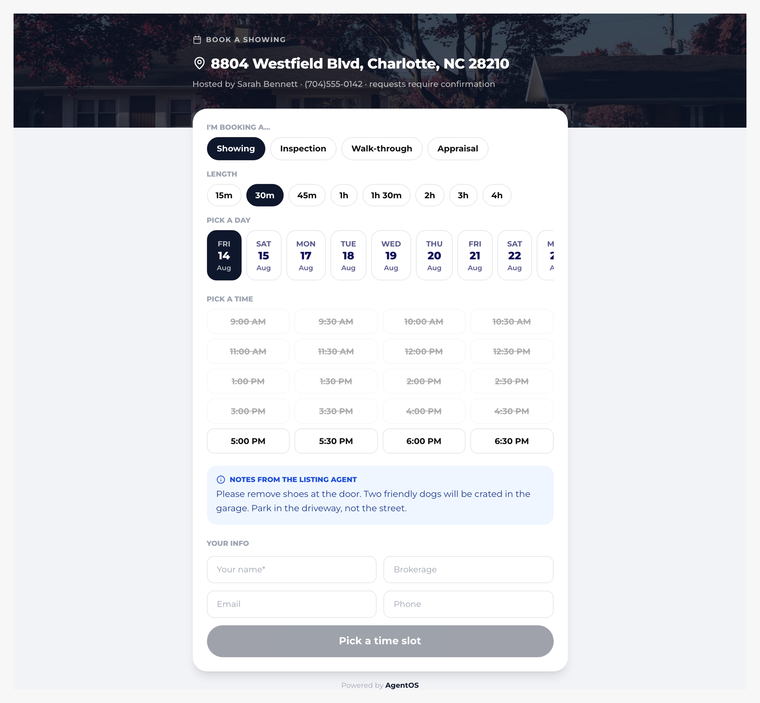
The whole flow, built in
Here’s showing management in AgentOS, end to end:
- A buyer’s agent requests a showing through your listing’s link
- Your seller gets a text or email and approves by simply replying
- Everyone gets automatic confirmations
- After the showing, feedback collection goes out on its own
Every listing gets its own rules, just like you’re used to: go and show for the vacant one, courtesy call for the owner who wants a heads-up, seller must confirm for the one with the night-shift nurse and two dogs.
Your seller never downloads anything
The seller experience is a text message. Request comes in, they reply to approve, done. No app, no portal login, no “can you resend that link.” It’s the lowest-friction version of showing approval that exists, which means it actually happens fast, which means more showings actually happen.
Feedback without the chase
Every listing agent knows the post-showing ritual: three voicemails to the buyer’s agent asking “any thoughts from your buyer?” AgentOS sends the feedback request automatically and collects the response for you, so your seller update calls come with actual substance.
And that feedback lands in the same system as your seller reports, your deadlines, and your transaction. One system, one story.
The “stop paying for this” moment
If you’re paying for ShowingTime or a similar service, look at what it does for you, and then look at the list above. Requests, approvals, rules, confirmations, feedback. It’s all here, it’s connected to the rest of your business, and it’s included in AgentOS.
This campaign has been about giving you more. Today is about letting you spend less. Cancel the separate subscription, keep the workflow.
This is Day 8 of 12. Tomorrow: the end of offer chaos.
Try AgentOS free for 7 days, no credit card.